Getting customer reviews is important for any business. Google reviews are often the first thing people look at before making a decision when they are choosing a restaurant, salon, shop or service. Real customer reviews can help a company establish a more reliable first impression and make new customers feel more secure.
But asking customers for a review isn’t always easy. Some are busy, some forget after they leave your store. That’s where a Google Review Card makes life so much easier. Customers can tap or scan the card and go directly to your Google review page without having to manually search for your business.
In this guide, we’ll cover what a Google Review Card is, how it works, its main benefits, and how to set it up for your business. We will also look into how Tapect can assist in making collecting feedback from clients easier.
A Google review card is a digital card that showcases positive reviews left by customers on Google My Business listings. It allows businesses to display these reviews directly to potential customers, helping to build trust and credibility.
What Is a Google Review Card?
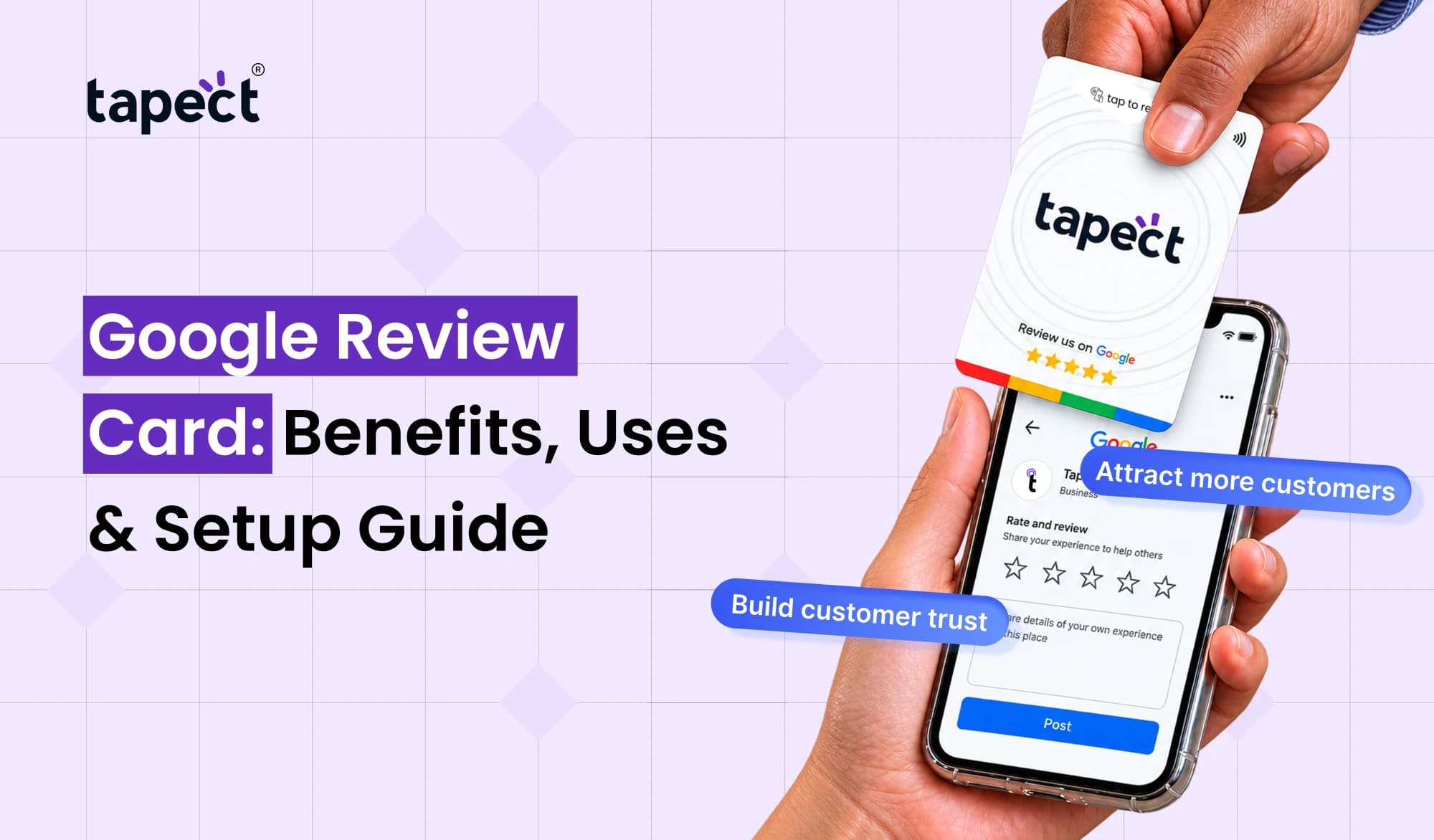
A Google Review Card is a physical card that allows your customers to instantly open your business’s Google review page with a tap of an NFC card, QR code or both. Instead of having your customers go online and search for your business, you give them a simple way to get to the review page.
Suppose you own a cafe, for example. When the customer has enjoyed their coffee, you can present the card at the counter. They can scan the QR code or tap the card with their NFC-enabled smartphone to open the review page and share their experience.
Businesses can use this card in a variety of locations, such as:
- Shops and retail stores
- Restaurants and cafes
- Beauty salons and spas
- Hotels and travel businesses
- Clinics and professional offices
- Home service businesses
A Google Review Card does not automatically produce reviews. It just makes it easier for actual customers to leave their own reviews.
Benefits of Using a Google Review Card
A Google Review Card in the right place can take the pain out of the review process for staff and customers. Its main advantages are as follows.
1. Make Leaving Reviews Easier
You might have happy customers who still forget to leave a review. Giving them a direct link removes the middle man.
No searching for your business name, finding the right listing and then searching for the review option. That way they can open the page directly from the card.
2. Save Time for Your Staff
Your team doesn’t have to walk every customer through the review process. Often a simple instruction such as Scan here to share your feedback is enough.
This is especially good for businesses that get a lot of customers every day.
3. Build Trust With New Customers
Many people look at reviews before deciding on a business. Genuine customer reviews help future customers understand the quality of your products or services.
More helpful reviews can give people a better sense of your business. But reviews should always be based on real customer experience.
4. Improve the Customer Experience
It’s a simple process of reviewing shows that you are interested in feedback from customers. This allows customers to share their thoughts while their experience is still fresh.
You can also find out what customers love and where your business needs improvement.
5. Support Your Local SEO Efforts
Customer reviews are important for local businesses as they can help people learn more about your services. Google local search systems consider factors like relevance, distance and prominence.
A Google Review Card helps customers find your review page easily but it does not guarantee better rankings. Focus on providing good service, getting genuine reviews and responding to feedback.
How Businesses Can Use Google Review Cards
There are various ways of using business review cards depending on how and where you meet customers.
At the Checkout Counter
Put the card near the payment counter. Once the customer has completed the purchase, staff can ask them to provide honest feedback.
In Restaurants and Cafes
Keep the card close to the billing desk or elsewhere handy. After you have eaten, customers can scan it and don’t need to ask for a review link.
In Salons and Spas
When an appointment is over, staff might say that they would appreciate feedback from customers. The card makes it simple to open the review page before they go.
For Service Professionals
Electricians, consultants, photographers and other professionals are able to take a review card with them when they visit clients. Customers can access the review page after the service has been rendered.
At Events and Exhibitions
The card can be used by businesses showcasing at trade shows to get feedback from real customers who’ve already used their products or services.
How to Set Up a Google Review Card
Google Review Cards are easy to set up with the right review link.
Step 1: Find Your Google Review Link
Sign in to the Google account that manages your Business Profile .
- Open your Google Business Profile.
- Find the option to ask for reviews.
- Select the option to share your review form.
- Copy the review link provided by Google.
The exact menu may vary depending on what interface you see.
Step 2: Choose Your Card Type
Choose between a QR-based card, an NFC card or a card that has both.
A QR code is scanned with a smartphone camera. An NFC card will open a link when a compatible phone is brought near the NFC chip on the card.
Providing both options offers more options to customers.
Step 3: Connect the Review Link
When you create your card, be sure to use the right Google review URL. If you use a QR code, make it from that link. If you are using an NFC card, program the chip to the same destination.
Step 4: Test the Card
Test it on different smart phones before you use it with customers.
Check that:
- The QR code scans clearly.
- The NFC chip opens the right link.
- The correct business review page appears.
- Customers can find the option to write a review.
Step 5: Place the Card Where Customers Can See It
Keep the card in a visible and accessible place. You can also include a short instruction like “Tap or scan to review us on Google”
Google Review Cards for Business: What to Look For
Before you purchase, see if the card meets your business needs.
- Easy to use: Customers should be able to open the review page without complicated steps.
- QR code support: This gives customers another way to access the link.
- NFC compatibility: Check that the card works with supported smartphones.
- Durable material: Choose a card that can handle regular use.
- Simple design: Make the review instructions clear and easy to read.
- Correct link: Confirm that the card opens your own business listing.
Check that the card opens your business listing. Correct link
Tapect is a provider of digital business card and NFC-based sharing solutions to enable contact sharing and other related experiences. Before you buy, be sure the exact product has the features you want and will work with your Google review workflow.
Google Review Card vs. Digital Business Card
A Google Review Card and a digital business card may look similar but are designed for different purposes.
A review card takes the customer to a review page. A digital business card usually includes your professional contact information, website, social profiles, and more.
Depending on the configuration, an NFC business card can also bring up a web link of your choice. This means that NFC technology is capable of supporting different uses, like sharing contact details, or opening a review page.
If your main objective is to collect feedback from clients, choose a review-focused card. If you want people to save your details and connect with you, go for a contact-sharing card. Some businesses may choose to use both.
Best Practices for Getting More Genuine Google Reviews
The card is just the beginning. How you ask customers to use it matters, too.
Here are some tips:
- Ask customers politely after providing your service.
- Make the card easy to notice and access.
- Explain that honest feedback is welcome.
- Respond professionally to both positive and negative reviews.
- Keep your business information accurate and updated.
- Never offer money, gifts, discounts, or other rewards in exchange for reviews.
- Do not ask only happy customers to leave reviews or discourage unhappy customers from sharing feedback.
Don’t just ask happy customers for reviews or discourage unhappy customers from leaving feedback.
Google does not allow fake engagement and incentivising for reviews. A fair process means you get feedback that’s based on real customer experiences.
How to Check My Google Reviews
Check your reviews regularly once customers start leaving feedback.
Sign in to your Google Business Profile and locate the reviews section. Here you can see what customers are saying, reply to comments and catch trends in issues.
Pay attention to the questions or concerns that occur more than once. For example, customers might mention waiting times, the behaviour of staff, the quality of products or problems with deliveries.
Use this info to improve your service. It is best to adopt a review strategy where you see feedback as a learning opportunity rather than a way to increase your review count.
Frequently Asked Questions
1) What does a Google review card do?
Google Review Card allows your customers to access your business’s Google review page with a tap of NFC or a QR code or both. It’s more convenient to share feedback
2. Does the card require an app for customers?
Most customers don’t require a dedicated review app. They can scan the QR code with their phone camera or use NFC on a compatible device. They may have to sign into Google to leave a review.
3. Can I use the same card for many places?
Each location should be directed to the right Google Business Profile. If you have multiple locations, use the correct review link for each location.
4. Google Review Card and Google Rankings
It can make it easier for customers to leave genuine reviews, but it does not guarantee better rankings. A number of factors determine whether you appear in local search results, including relevance, distance and prominence.
5. Do NFC cards work for gathering Google reviews?
Yes, if you are able to configure the card to open your Google review link. Test the card to ensure it opens the correct page before handing it out to customers.
6. How much is a Google Review Card?
Price depends on card material, design, NFC features and provider. Check the current price and product details before purchasing.
Conclusion
Collecting feedback from clients doesn’t need to be hard. A Google Review Card makes it easy for customers to get to your review page and share their experiences so that others can learn more about your business.
For example, businesses can make review cards available in retail stores, restaurants, salons, and professional services where customers can find them easily. The trick is to select the right link, test the card, ask nicely and follow Google’s review policy.
Want to make your customer connections easier? Learn more about Tapect’s NFC & Digital Business Card Solutions and find a solution that fits your business needs. Make it easy for your customers to connect with you, find useful information, and share honest feedback.
 16 Oct 2026
 business