Customer reviews can have a huge impact on any business. When people want to try a new restaurant, visit a salon, hire a service provider, or buy a product, they often check online reviews before making a decision. Good feedback builds trust and gives new customers a reason to choose your business.
But getting customers to do a review is not easy. There are people who are happy with your service but they don’t share their experience online. Some may not know how to give their feedback.
This is where Google Review Business Cards can help. They make it easy for your customers to get to your Google review page and let you know what they think. Tapect makes the process easier for businesses through the use of smart review cards that link the offline customer experience to online feedback.
Let’s take a look at how these cards work, why they are helpful and how your business can use them to get more authentic customer reviews.
What Are Google Review Business Cards?
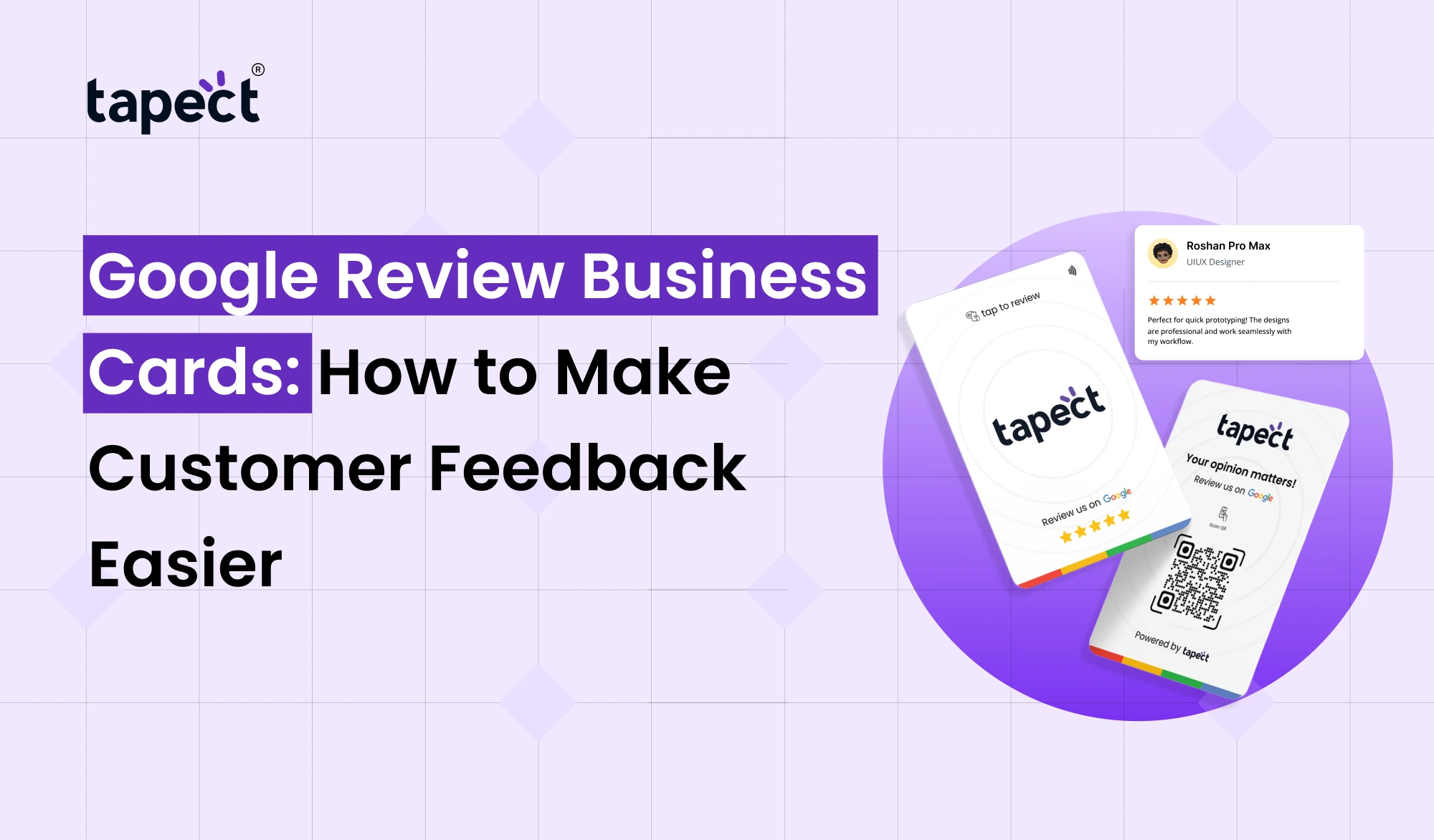
Google Review Business Cards are cards, either physical or digital, that help your customers find your business’s Google review page. These are typically either a QR code, NFC chip, or both.
Customers simply scan the code with their smartphone camera or tap an NFC-enabled card to a compatible smartphone. Your phone brings up a link to your review page that the customer can share their experience.
Instead of finding your business on Google and getting the right listing, customers can get to the review page in a few steps.
A salon owner might put a review card near the payment counter. The owner may offer the customer to scan the card and leave candid feedback after their appointment.
These cards are used for:
- Restaurants, cafes, and hotels
- Salons and beauty clinics
- Retail stores and local shops
- Doctors’ offices and service providers
- Real estate agents and consultants
- Home repair and cleaning businesses
Why Are Google Reviews Important for Your Business?
Customer reviews tell people what they can expect from your business. Seeing real experiences from others can help potential customers feel more comfortable contacting you or purchasing.
Here are some reasons why reviews matter.
1. Build Trust With New Customers
People tend to compare businesses before they decide. Good first impressions start with positive, authentic reviews for your business.
You are also trained on how to deal with questions, complaints and suggestions from customers. It shows you care about customer experiences with a thoughtful response.
2. Improve Your Local Online Presence
Reviews are one part of your local search presence on your Google Business Profile. When Google shows you local results, it considers a few things: relevance, distance and prominence.
You can’t just gather reviews and guarantee higher rankings. But it can help your overall local marketing efforts by simplifying the process for happy customers to provide honest feedback.
3. Learn What Customers Like
Reviews can show you what your business is doing well and where you can do better.
For example, customers might praise your staff but also comment on long waiting times. This feedback may be used to improve your service.
4. Help Customers Make Better Decisions
When people are looking for a local business they are looking for useful information before they visit. Reviews give them an idea of other customers’ experiences and can help them figure out if your business is a good fit for their needs.
How Do Google Review Cards for Business Work?
Google review cards for business make it easy to connect customers to your review page. It’s a straightforward process and customers won’t have to download a separate app.
Here’s how it works:
Create your review link Find your business review link in your Google Business Profile.
- Create your review link: Find the review link for your business through your Google Business Profile.
- Add the link to a card: Use a QR code, an NFC chip, or both to connect the card to your review page.
- Give customers easy access: Place the card where customers can see it, such as a reception desk, billing counter, or service area.
- Invite honest feedback: Ask customers politely if they would like to share their experience.
- Respond to reviews: Thank customers for their feedback and address concerns in a professional way.
Reply to reviews Thank customers for their feedback and address any issues professionally.
Tapect enables businesses to find smart card options to facilitate sharing of review links.
How to Use a Google Review Card to Get More Feedback
The Google Review Card works best when you embed it in your customer service process. No need to push customers. No need to interrupt their experience.
Place the Card Where Customers Can See It
It matters where your card is. If they can’t see it, they may not realise it’s available.
Try putting your card in these places:
- Near the billing counter
- At the reception desk
- On restaurant tables or checkout counters
- Inside a service package
- At the end of a customer appointment
Keep the card in sight and handy. You can also add a small message like “Share Your Experience on Google” to give context.
Ask at the Right Time
Timing can make the request sound more natural. For example, a customer who has just received a useful service may be more likely to provide feedback than one who is still waiting for service.
Train your team to ask in a friendly way without pressurising the customers.
A simple line like “Thank you for visiting us! If you have a moment we’d appreciate your honest feedback on Google.
Make the Process Simple
The easier you make an action for a customer, the more likely they are to complete it. With a direct link, you don’t have to look for your business and find the right listing.
Test the card prior to use. Ensure that the QR code scans correctly and the NFC link leads to the correct page.
QR Code or NFC Business Card: Which Is Better for Reviews?
Both QR codes and NFC technology can direct customers to your review page. Which one is right depends on your business needs.
QR Code Cards
If you have a business that wants an easy and low cost way to distribute review links, a QR code is a great choice.
Includes benefits:
- Customers can scan it with a phone camera.
- It works without an NFC chip.
- You can print it on cards, posters, menus, and signs.
- It is easy to display in busy customer areas.
NFC Business Card
An NFC business card has a small chip that transmits a link when tapped against a compatible phone.
The benefits are:
- Customers can open the review page with a simple tap.
- The card looks modern and professional.
- It can reduce the steps needed to find your review page.
- Some card designs can support other business links as well.
Note that your NFC settings and phone compatibility can affect your experience. If a tap doesn’t work, a QR code is a handy backup.
Many businesses combine QR and NFC features to provide customers with two simple ways to access the same review page.
Best Practices for Using Business Review Cards
Make business review cards work for you by focusing on convenience, honesty and a great customer experience.
Here is what you do:
- Keep the design clear: Make the card easy to understand and use.
- Use a direct review link: Avoid sending customers through several pages.
- Test before printing: Scan the QR code and test the NFC feature on compatible phones.
- Train your team: Make sure staff know how to explain the card.
- Respond to feedback: Thank customers and address concerns politely.
- Check performance: Review your feedback trends and look for ways to improve service.
Google doesn’t allow businesses to offer rewards or discounts in exchange for reviews. And you should not limit yourself to asking your happy customers. Let all customers have a fair chance to tell their real experience.
By following these rules, you will build trust and keep the review process fair.
How to Find Your Google Review Link
First you need the right link for your business to make a review card.
Follow these steps:
- Sign in to the Google account that manages your Google Business Profile.
- Search for your business on Google.
- Open the profile management options.
- Look for the option to request reviews or share your review link.
- Copy the link provided by Google.
- Open the link in another browser or phone to check that it works.
Once you have the link, you can use it to generate a QR code or create an NFC card.
Make sure you’re using the right business listing, especially if your business has more than one location.
How Tapect Can Help Your Business
Tapect provides digital networking and smart card solutions to help businesses easily share information. QR codes and NFC features can link customers to helpful online destinations, depending on the product you choose.
A review-oriented card can be a simple consumer feedback tool. Rather than asking customers to look for your business, you can offer them a direct path to your review page.
Tapect solutions enable businesses to:
- Make review links easier to access.
- Give customers a simple scanning or tapping experience.
- Create a modern and professional impression.
- Support a consistent feedback process across customer locations.
- Connect physical interactions with useful online resources.
Before you choose, review the product’s features to ensure it’s compatible with your review-link configuration.
How to Check Your Google Reviews and Improve Your Service
But getting reviews is just one part of the process. You need to read and respond to feedback that customers leave.
See new reviews in your Google Business Profile. If you want to look up reviews tied to your account, you can also search for “my google reviews.” Exact results will vary depending on whether you’re signed in as a customer or a business manager.
- Are customers happy with your service quality?
- Do people mention friendly or helpful staff?
- Are there repeated complaints about delivery or waiting times?
- Have customers suggested changes that could improve their experience?
Responses to reviews are calm and helpful. Thank people for positive feedback and respond to negative comments without disclosing private customer information.
You can also see how many reviews you get over time. A review card may not guarantee more reviews, but it can remove some of the reasons why customers don’t leave feedback.
FAQ’s
1. What are Google Review cards used for?
Google Review Business Cards allow customers to visit a business’s Google review page via a QR code, NFC chip or direct link. Customer experience sharing is enabled by them.
2. How easy is it to setup Google review cards for business?
Yes. Usually, you need a valid Google review link and the right design for the card. If the card is NFC based, ensure the chip is programd correctly and test it before sharing with customers.
3. Can I use both a QR code and NFC on the same card?
Yes. A card can support both features . If the card design and hardware support both . The customer can scan the QR code or tap on their phone to get to the link to the review.
4. Will Google Review Business Cards Increase Reviews?
No. They assist the review process but it’s up to the customer if they want to leave feedback. Good service, a polite request and an easy process can go a long way to encouraging participation.
5. Can I give a discount for a Google review?
No. Google doesn’t allow discounts, gifts or other incentives in exchange for reviews. Do not offer any reward and ask customers for honest feedback.
6. Can review card boost google rankings?
Having a review card doesn’t mean higher ranking. While genuine reviews can improve your business’s local visibility, Google takes into account factors like relevance, distance, prominence, and more.
Conclusion
Feedback from customers can help your business build trust, understand customer needs, and improve your online presence. The trick is to create a simple way for people to share their experiences without adding more steps.
With Google Review Business Cards you can easily link your customers directly to your review page. A clear design, a working link and a friendly request can make it easy for customers and staff alike.
If you own a salon, restaurant, retail store or service company, it’s easy to incorporate a QR-enabled or NFC-enabled review card into your normal customer service routine.
With Tapect you can find smart card solutions for connecting your offline customer interactions with online feedback.
Want to make customer reviews easier?
Learn more about Tapect’s smart card solutions and discover a convenient way to connect your customers to your Google review page. Treat every customer interaction as a chance to learn, improve and build lasting trust.
 16 Oct 2026
 business